Monaco
Monte Carlo retirement scenario analysis, right in your browser.
What is Monaco?
Monaco is a financial planning tool that lets you model your retirement with real-world detail and uncertainty. Define your current financial picture as a baseline, build any number of scenarios that tweak the assumptions, and run Monte Carlo simulations to see the full range of outcomes — from worst case to best. It pays special attention to the “widow tax”: the jump in tax rates and shrinking deductions a survivor faces when filing status shifts from Married Filing Jointly to Single.
The whole app runs as a single page in your browser. There is no account to create, nothing to install, and your plan never leaves your device.
A look inside
A natural working progression
The app is organized as four top-level tabs, in the order you actually work:
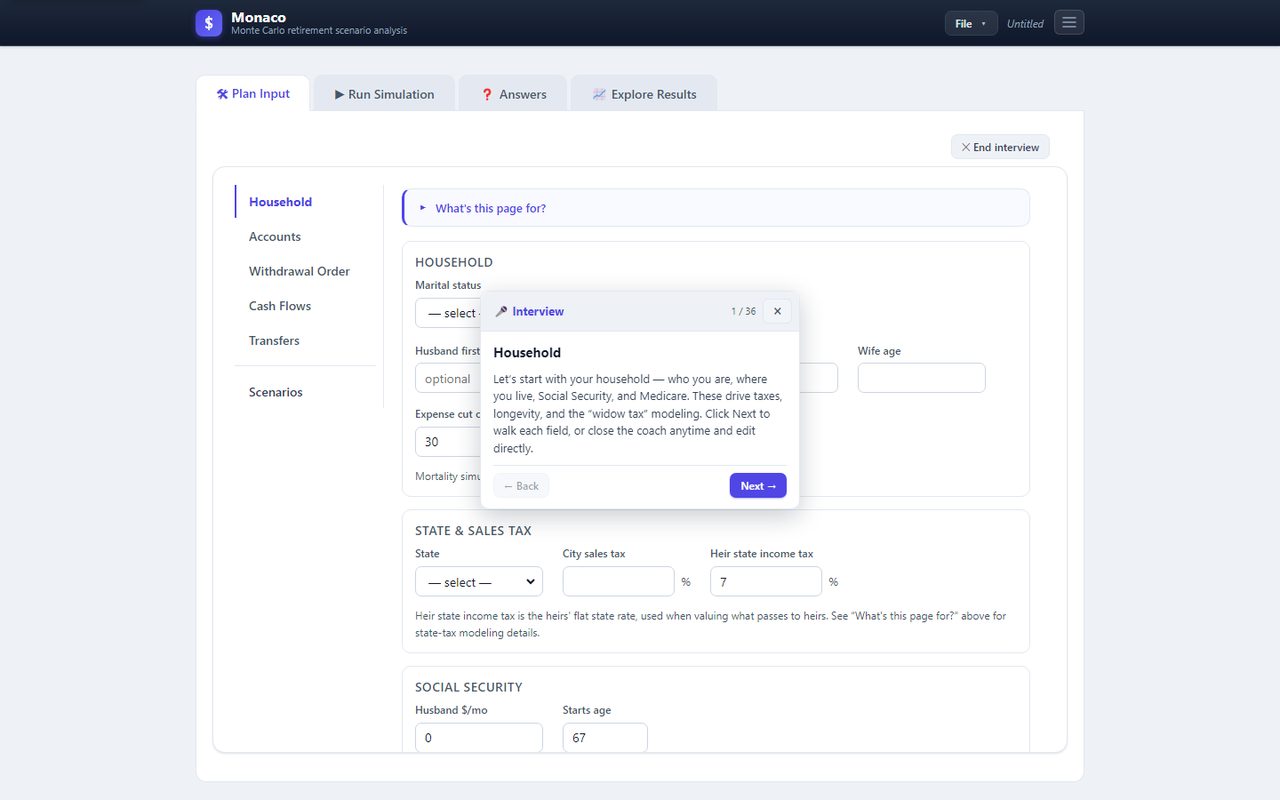
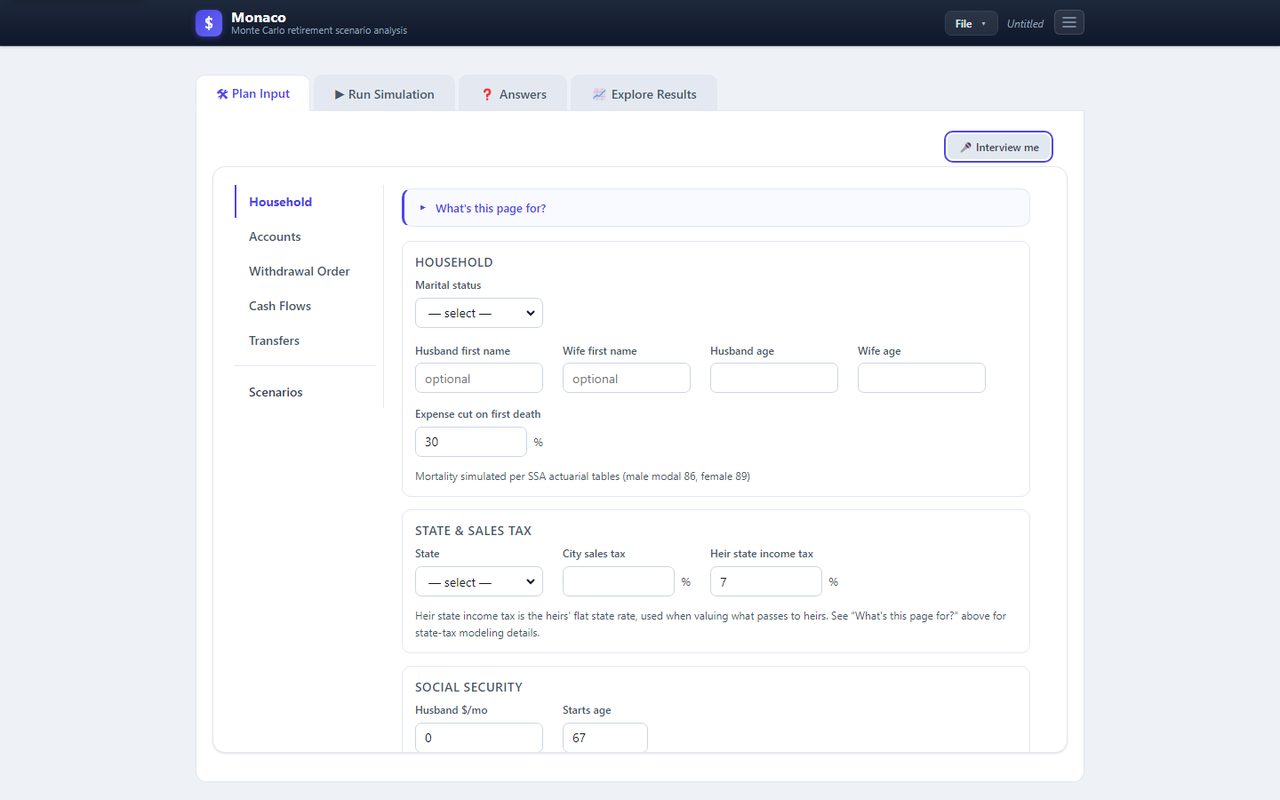
- Plan Input — a full editor with a vertical sub-tab rail: Household, Accounts (grouped into Asset Accounts, Physical Assets, and Liabilities), Withdrawal Order, Cash Flows, Transfers, and Scenarios. Every tab opens with a collapsible “What's this page for?” plain-language intro. Click 🎤 Interview me for Interview mode: a draggable popup walks every field in order with a plain-language question, an expandable “What's this?” explainer, quick-answer buttons, a good-default button, and an embedded copy of the control so you can answer without leaving the popup. It even walks the Add-Account dialog field by field — with a “skip advanced details” shortcut — and follows along if you click into any field yourself. Starts automatically on a blank plan.
- Run Simulation — one page, one job: the Run button with a progress bar, plus the simulation dials (years, iterations, inflation model, random seed) in a collapsible Controls panel. Sensible defaults mean most people just press Run.
- Answers — plain-English answer cards for the questions a planner is most often asked: Can I retire safely? How much can I spend? When can I retire? What could go wrong? What should I do next? How do taxes affect my plan? How much will I leave behind? The optimizers live here too, as questions — Find Best Plan, Max Spending, and When can I retire? — alongside built-in searches that test 300 Roth-conversion strategies or every Social Security claim-age combination and report the winner in a sentence.
- Explore Results — the full analysis surface for deeper digging: Compare Details, Compare Scenarios, Sensitivity, year-by-year Report, Percentile Summary, 1-Page Summary, and Search Report subtabs.
The appbar at the top is always available: a File menu (New / Open / Save As) for your plan, plus a hamburger menu with Settings and About.
Household
- Individual or married couple (with first names) and per-account ownership: husband, wife, or joint
- Actuarial life-expectancy simulation calibrated to SSA mortality tables (Gompertz model: male modal age 86, female 89)
- State of residence, city sales tax rate, configurable heirs' state income-tax rate, and an “expense cut on first death” percentage
- Per-spouse Social Security benefit and claim age (survivor receives the larger of the two)
- Per-spouse Medicare start age (blank = not enrolled) and prior-year MAGI to seed the IRMAA two-year lookback
Accounts
- Ten account types: Taxable, IRA/401k, Roth IRA, Health Savings Account (HSA), Cash (checking, savings, money market), Real Estate, Loan, Pension/Annuity (a defined-benefit stream with J&S survivor option and COLA), Legacy Trust (irrevocable, outside the taxable estate), and Physical Asset (a depreciating personal asset like a car)
- Multi-class holdings: every Taxable / Roth / IRA / HSA account splits its balance across up to four holdings — Stocks, Bonds, Real Estate, and Cash — each with its own balance, expected return (μ), volatility (σ), market β, α (excess return), and (for taxable) cost-basis % and dividend yield
- Set mix… wizard fills holdings from a preset (Conservative · Moderate Conservative · Moderate · Moderate Aggressive · Aggressive) or custom percentages over a chosen total
- Glide… popup schedules a linear drift toward a target mix over N years; the engine rebalances each year toward the interpolated mix
- Cash accounts: minimum and maximum balance with auto-transfers to keep the balance in range, plus a configurable interest rate (default 4%) taxed as ordinary income
- Real Estate accounts: purchase price, improvements, annual insurance, property-tax rate, maintenance rate, and sale parameters (agent commission, closing fee, REET tax)
- Loan accounts: interest rate, annual payment, and an optional secured by home link so the loan is paid off automatically from the proceeds when that home is sold
- RSU / employee-stock vesting schedule on taxable accounts — each vest adds shares and basis and is taxed as ordinary income that year
- Concentrated-equity risk: per-holding market β and α capture single-stock positions that don't behave like the broad market
Houses
- Home value appreciates with the housing market and is correlated with stocks and bonds
- Annual carrying costs: homeowner's insurance (inflation-adjusted), property tax (% of value), and maintenance (% of value)
- Sell houses via scenario transfers with full tax modeling: federal LTCG and NIIT on the gain, the $250K (Single) / $500K (MFJ) primary-residence exclusion, agent commission, closing fee, REET tax, and a stepped-up basis when a house is inherited
- Any mortgage secured by the home is paid off from the proceeds at closing
- Relocate scenario: a guided move that bundles selling the current home, switching to a new state (income, sales, and estate taxes all follow), one-time moving costs, renting for a period, and buying a new home (financed with an amortizing mortgage or paid in cash)
Income, expenses & cash flows
- Employment income on a flexible year-range schedule (each stream gets a name so you can identify it later)
- Social Security income with survivor benefits and per-spouse claim age
- Required Minimum Distributions starting at age 73 (IRS Uniform Lifetime Table III, SECURE 2.0)
- Taxable account dividends and interest (qualified for stocks, ordinary for bonds and cash)
- Pension / annuity streams with J&S survivor percentage and COLA
- Private medical insurance schedule (healthcare-inflation-adjusted), used before Medicare eligibility
- Medicare per-spouse start age with full IRMAA surcharges driven by MAGI from two years prior
- HSA accounts that pre-tap tax-free to pay each year's medical and Medicare premiums
- Rent schedule for non-homeowners (general-inflation-adjusted; not subject to city sales tax)
- General joint expenses (inflation-adjusted, reduced on first spouse death by your configurable %)
- City sales tax applied to general spending
- Charitable / family gift schedule (after-tax outflow, no deduction)
Taxes
One computeTaxes function is shared by the simulation engine and the detail report, so what you see on a year-by-year row always reconciles with the net-worth path. The base tax year is 2026 (IRS Rev. Proc. 2025-32, reflecting the One Big Beautiful Bill Act), with brackets and deductions inflation-indexed each simulation year.
- Federal income tax: progressive 10/12/22/24/32/35/37 brackets (MFJ and Single), inflation-indexed
- Standard deduction with over-65 additions, plus the OBBBA senior bonus deduction for 2025–2028
- Long-term capital gains: 0/15/20% brackets stacked on ordinary income, inflation-indexed
- Qualified dividends taxed at LTCG rates; bond interest and cash interest stay ordinary
- NIIT: 3.8% net investment income tax with statutory (frozen) $200K Single / $250K MFJ thresholds
- Social Security taxation via the provisional-income method with the frozen-since-1993 thresholds
- State income tax: graduated brackets for CA, NY, HI, OR (Single + MFJ, inflation-indexed) and flat effective rates elsewhere, with retirement exemptions for IL, MS, and PA
- Federal estate tax: 40% above a $30M combined exemption (portability) for married, $15M for single, inflation-indexed
- State estate tax: 13 states plus DC with state-specific exemptions and rates, inflation-indexed
- Heir state income tax: configurable flat rate (default 7%) applied to the inherited IRA and to long-term gains in a legacy trust
- City sales tax on general spending
- Home-sale taxes: LTCG and NIIT on the taxable gain, with the primary-residence exclusion and transaction costs
The in-app Tax Rules button (accessible from the About dialog) opens a complete reference of every bracket, threshold, and rate the model uses, with sources.
Estate planning & the legacy trust
- Irrevocable legacy trust accounts sit outside the taxable estate — gifted assets grow there free of estate tax
- After-tax value to heirs taxes only the gain over the trust's contributed basis (top 20% federal LTCG + 3.8% NIIT + the heir state rate)
- Trust basis is source-dependent: cash, Roth, and (already-distributed) IRA dollars contribute full after-tax basis; appreciated taxable stock carries over the donor's proportional cost basis, so the embedded gain follows the stock into the trust
- At the second death, the model values the inherited IRA at heir brackets and gives taxable accounts a stepped-up basis (SECURE Act 10-year rule on inherited IRAs)
Scenarios
Your baseline plan is never mutated. Every “what if” lives as a scenario that inherits the baseline and overrides only the fields you change.
- Unlimited scenarios, each comparable side by side
- Override baseline account variables through the full Account Editor — fields that differ from baseline highlight amber and grow a reset arrow that restores the original value
- Add scenario-only accounts (a legacy trust, a synthesized Roth, etc.) without touching the baseline
- Per-scenario transfers (Roth conversions, gifts to a trust, selling company stock…) plus the ability to disable any inherited baseline transfer
- Override scenario-level settings by category: Cash Flows, Social Security, Household, Survivor expense cut, Simulation parameters, and per-account returns
- Relocate scenario — a higher-level “move” template with enable toggles for sell · change state · moving costs · rent · buy (financed or cash)
Find Best Plan, Max Spending & When can I retire?
Three built-in searches, launched as questions from the Answers tab, each save their result as a new scenario so you can compare or delete it like any other:
- Find Best Plan: coordinate-descent search with a goal toggle (Maximize Net Worth or Minimize Taxes) and a user-set success-rate floor. Searchable levers include Social Security claim ages, withdrawal order, Roth conversion schedule, glide path, cash window, irrevocable legacy trust gifting, portfolio mix per account, sell company stock over time, and state of residence among candidate states. Uses common random numbers and a disjoint held-out seed stream to flag non-robust winners.
- Max Spending: binary search for the highest extra annual spending you can add to a year range while keeping success above your threshold.
- When can I retire?: pick one or more income streams; the search finds the earliest year they can stop while keeping success above your threshold.
Explore Results
The Explore Results tab pulls from one shared per-plan cache so every view reconciles with the others.
- Explore Details — one plan, with toggleable per-year series for Net Worth, Income, Expenses, Withdrawals, Deposit, Taxes, Assets, and Liabilities. Each line has hover tooltips with per-component breakdowns; below the chart, a Chance of Success gauge, a Net Estate Value chip, and a Total Taxes Paid tile.
- Explore Scenarios — pick one detail series and overlay it across the baseline plus any subset of scenarios; checkbox state persists across runs and sessions.
- Sensitivity — a tornado chart that perturbs each major input (stock μ, inflation, healthcare inflation, joint spending, lifespan, Social Security start age) and ranks them by impact on p50 ending net worth, with a companion CVaR(10%) column so downside-driving dials surface even when the median is robust.
- Report — the detailed year-by-year output: top summary table (p10 / p50 / p90 / % Success), starting balances, every year's income, taxes, withdrawals, cash flow, per-account balances, and net worth, plus an Ending Balances and Net Estate Value block. A Future $ / Today's $ toggle re-renders everything in inflation-adjusted dollars.
- Percentile Summary and 1-Page Summary for compact, shareable views.
- Search Report — a read-only audit of the most recent Find Best Plan run: search size, every variable's candidates, baseline vs chosen, evaluation and seed counts, and the held-out validation picks.
- Save the current view as a PDF directly from the toolbar.
Simulation engine
- Monte Carlo with a configurable trial count (default 25,000) over a configurable horizon (default 30 years)
- Correlated stock / bond / housing returns via 3×3 Cholesky decomposition, with lognormal growth that guarantees positive balances
- Optional stochastic inflation — set an inflation volatility and each year's rate is sampled and compounded path-dependently; healthcare inflation tracks the same draw plus its fixed spread over CPI
- Optional fixed RNG seed for bit-for-bit reproducible runs — great for auditing or stable scenario comparison
- Mortality, RSU vesting, growth, RMDs, Social Security, taxes, withdrawals (fixed-point solved so the tax bill funds itself), transfers, and cash auto-transfers run in that order each simulation year
- Aggregation across trials reports p10 / p50 / p90 of ending net worth and the percentage of trials that hit ruin
Why Monte Carlo?
Markets don't deliver a steady average return year after year — and a single “expected” projection can hide the risk of running out of money. Monaco runs thousands of randomized simulations so you see a full distribution of outcomes, including the chance that a plan fails. Comparing scenarios side by side turns hard questions — when to claim Social Security, whether to sell a house, how a spouse's death changes the math — into clear, quantified trade-offs.
Display & settings
- File menu — New (reset to default), Open (import JSON), Save As (export your plan as portable JSON)
- Settings dialog — show spending and liabilities as negative and/or in red; preferences stored separately so New / Open won't reset them
- Draggable modals with overlay-click dismissal; no native browser pop-ups
- Auto-save to
localStorageon every edit, so refreshing the page never loses work - Mobile-responsive layout — the File menu collapses into the hamburger on narrow viewports
- Per-tab “What's this page for?” intros for the Plan Input sections
Privacy
- Your plan stays on your device. Everything you type — names, ages, balances, Social Security amounts, scenarios — is saved only in this browser's
localStorage. Nothing is transmitted to the server or to any third party. - What the server collects. Two global aggregate counters: total page loads and total simulation runs (shown in the About box). No per-user data, no IP logging by the app, no request bodies persisted.
- No third-party trackers. No analytics, no cookies, no advertising pixels, no remote fonts or scripts.
- Export & reset. File → Save As downloads your full plan as portable JSON; File → Open loads one back. An Erase all data on this device button removes every Monaco key from the browser, including display preferences.
- Shared-device warning. Your plan is stored unencrypted in this browser's storage. Anyone with access to the same browser profile, or a malicious browser extension, can read it — don't use the app on a shared or public computer without erasing your data afterwards.
Monaco has its own dedicated policy separate from the Yellow Sun Systems LLC umbrella — see the Monaco Privacy Policy for the full terms.
Important — please read before using Monaco
Educational illustration only — not investment, tax, legal, accounting, or estate-planning advice. Figures Monaco displays are modeled estimates under your own assumptions; real outcomes will differ. Tax tables, brackets, and state rules reflect our best understanding as of the build date and may not be current as of your planning or filing year. The "Find Best Plan," "Max Spending," and "When Can I Retire?" outputs are search results under your stated objective, not recommendations; the app does not know your full situation. The "% Chance of Success" gauge is a Monte Carlo estimate conditional on your assumptions. Consult a licensed professional (such as a Certified Financial Planner, Certified Public Accountant, or attorney) before acting on anything Monaco displays.
You must be at least 18 years old to use Monaco. Use of Monaco is subject to our Terms of Service (see Section 5 for Monaco-specific terms, including limitation of liability and binding individual arbitration with a class-action waiver and 30-day opt-out) and the Monaco Privacy Policy.